LESS EFFORT. BETTER RECORDS.
Less to remember.
More clarity.
Expense tracking that fits into real life.
Made for Android · Private early access
A payment.
A prompt.
A place for it.
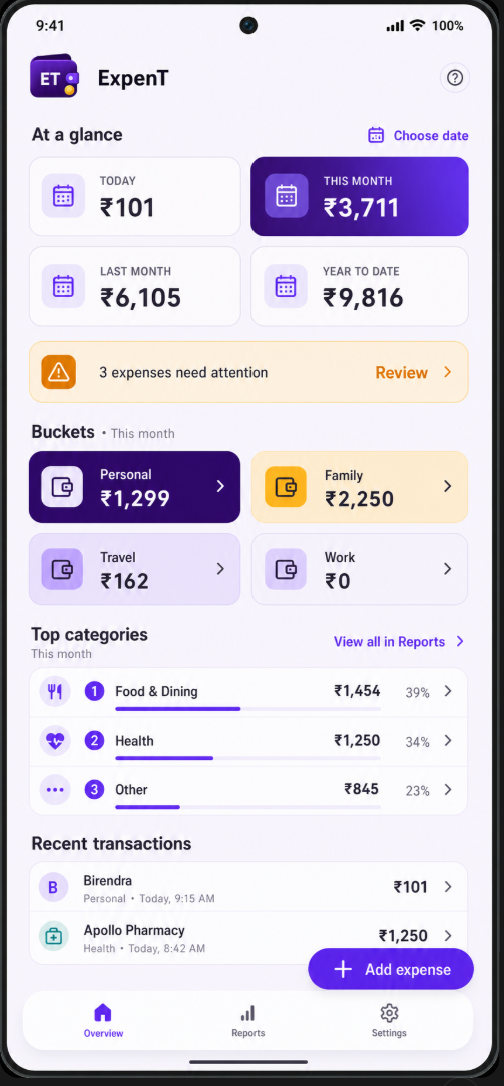
Your life, organised
your way.
01 / UNDERSTAND YOUR SPENDING
Where did this
month’s money go?
See the patterns.
Decide what to change.
02 / REMEMBER LESS
I meant to record it.
Then life happened.
Capture eligible payment alerts
while they’re fresh.
With your permission, on your phone.
Prefer to add expenses yourself? You can.
 ExpenT· now
₹2,480 · Groceries · UPI
Market Square · Suggested: Groceries
One tap. In your Family bucket.
Go on, pick a bucket.
Interactive illustration · no real expense is saved
03 / KEEP RESPONSIBILITIES CLEAR
Personal, family, work.
All from one account.
Keep different responsibilities
clearly separated.
“How much did I pay
on their behalf?”
Your buckets. Your categories. Your way.
04 / HAVE THE RECORDS READY
Time to claim.
Where are the receipts?
Tickets, stays, meals.
Keep the proof with the payment.
One trip. Everything in its place.
Tap an expense.
There’s your bill.
Illustrative trip and supporting records
USEFUL TRACKING. YOUR CONTROL.
Your records stay
on your phone.
Your ledger and receipts stay local unless you choose to share, export or back them up.
Read about your privacy- On-device payment processing
- No ads or analytics
- No cloud ledger
- Optional permissions
A FEW THINGS YOU MIGHT WONDER
Good questions.
A little clarity before you begin.
Does ExpenT need access to my bank account?
No. ExpenT does not connect to your bank or ask for banking credentials. With your permission, it recognises eligible incoming payment SMS alerts on your Android phone.
Can I use it without SMS permission?
Yes. You can add expenses manually. SMS permission is optional, and you can change your choice in Android Settings. Supported alerts vary by sender and format, so some expenses may still need manual entry.
Can I keep receipts and export a report?
Yes. Keep supporting records with individual expenses, filter the records you need, and export Excel or CSV reports and receipt packages. You choose when and where to share them.
What does private early access mean?
ExpenT is currently available to invited Android testers. Contact us to request an invitation. The alpha uses an online service only when you open its feedback portal and choose to send feedback; it does not upload your ledger or receipts.
A LITTLE ATTENTION NOW. A LOT LESS SORTING LATER.
Make room for life.
Keep the records.
Try ExpenT through our private Android early access.
Request an invitationOpens your email app. Or write to expentsupport@aceaum.com.